How to Record TikTok Live When You’re Offline
Yes, you can record TikTok Live when you are offline by using a cloud live recorder. Instead of keeping your phone or computer online, AutoRecordLive monitors the TikTok live room in the cloud and starts recording when the streamer goes live.
Add the TikTok live room once, and AutoRecordLive can monitor it, record the live stream automatically, and save the recording in your dashboard.
Why Offline TikTok Live Recording Matters
TikTok Live streams often happen at inconvenient times. You may be working, sleeping, traveling, or in a different time zone. If you rely on manual screen recording, you have to be online exactly when the live starts.
- Follow creators in another time zone
- Save long live streams for later review
- Record training, selling, gaming, music, or educational sessions you have rights to record
- Avoid keeping your phone or computer awake for hours
- Avoid missing unexpected live streams
Why Manual Screen Recording Does Not Work When You’re Offline
A phone screen recorder or desktop recorder only works while your device is online and actively playing the live stream. If your phone is locked, your computer sleeps, the app crashes, or you miss the start time, the recording may fail.
- Your device must stay online
- TikTok Live must stay open
- You need enough local storage
- Your network connection must stay stable
- Sleep mode, battery saving, or app crashes can interrupt recording
That is why offline TikTok Live recording usually requires cloud monitoring instead of local screen recording.
How Cloud TikTok Live Recording Works
Cloud recording means the monitoring and recording process runs on a remote server instead of your local device. Once you add a TikTok live room, AutoRecordLive checks the live status and starts recording when the streamer goes live.
- 1You add a TikTok live room URL
- 2AutoRecordLive monitors the live room in the cloud
- 3Recording starts when the streamer goes live
- 4The recording is saved to your dashboard after the live ends
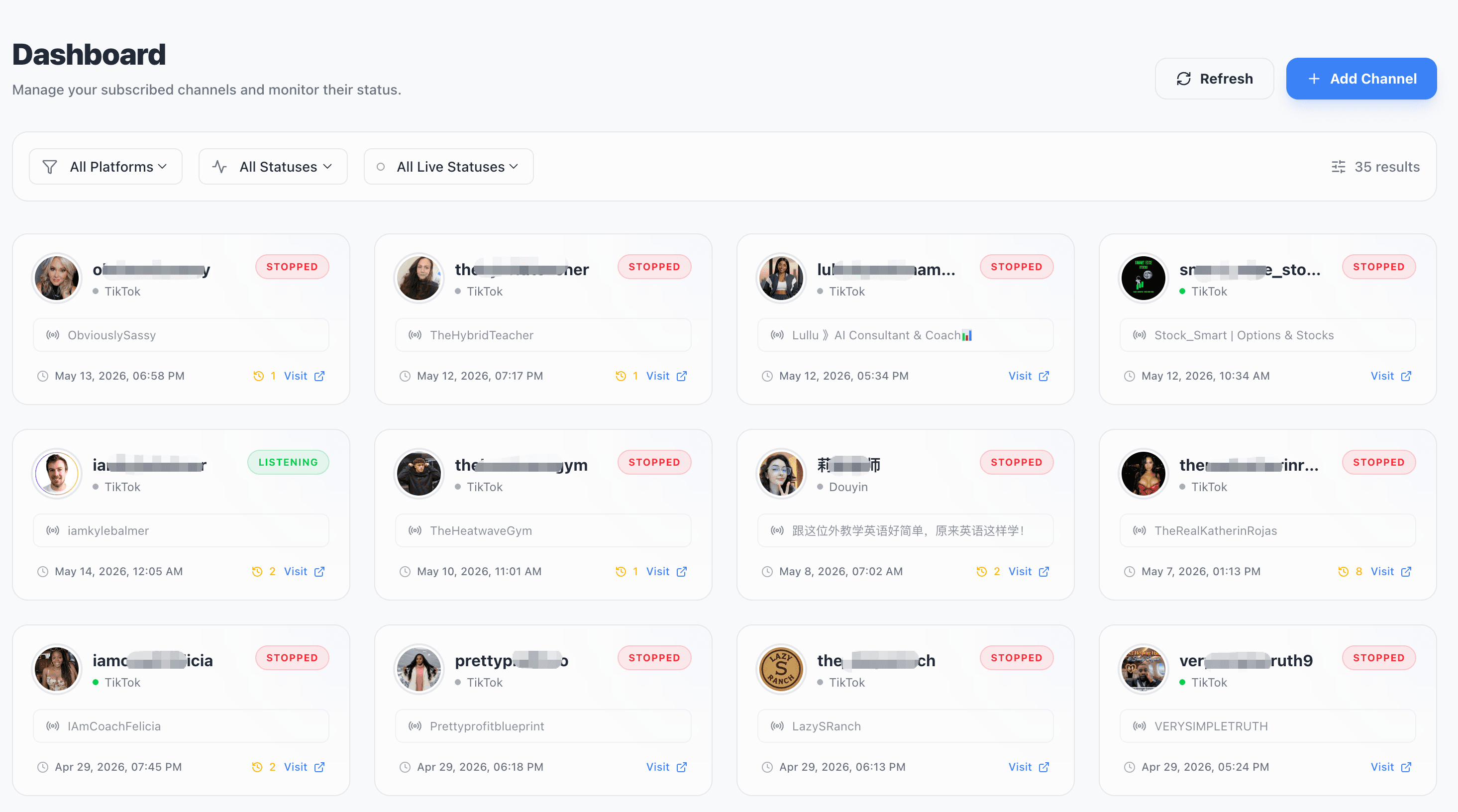
TikTok live room monitoring in AutoRecordLive
After a live room is added, the dashboard shows the monitoring task and recording status so you can come back later to review the result.
How to Record TikTok Live When You’re Offline with AutoRecordLive
Step 1: Create an AutoRecordLive account
Create an account so your live rooms and recordings can be saved in your dashboard.
Step 2: Add the TikTok live room
Paste the TikTok live room URL or creator live page into AutoRecordLive.
Add a TikTok Live RoomStep 3: Let AutoRecordLive monitor the stream
After the live room is added, you do not need to keep your phone, computer, or browser open. AutoRecordLive monitors the live room in the cloud.
Step 4: Come back later and download the recording
When the live stream ends and processing is complete, you can return to your dashboard, watch the recording online, or download it as an MP4 file when available and when your plan and content rights allow it.
Start Free TrialCan You Record TikTok Live Without Keeping Your Phone On?
Yes. With cloud recording, your phone does not need to stay on after the TikTok live room is added. AutoRecordLive handles monitoring and recording on the server side, so you can close your browser, turn off your device, or come back later.
The recording still depends on stream availability, platform access, and your recording plan.
Can You Record TikTok Live Without a Computer?
Yes. You do not need to run desktop recording software or keep a computer online. AutoRecordLive is designed as a cloud TikTok Live recorder, so the recording task does not depend on your local computer once the live room has been added.
Offline Cloud Recorder vs Manual Screen Recorder
| Feature | Manual Screen Recorder | AutoRecordLive |
|---|---|---|
| Works when you are offline | No | Yes, after setup |
| Requires phone to stay on | Yes | No |
| Requires computer to stay on | Yes | No |
| Starts automatically | No | Yes |
| Handles unexpected live streams | Easy to miss | Monitors in the cloud |
| Saves recording for later | Manual | Yes |
| MP4 download | Manual export | Available after processing |
| Best for long live streams | Risk of interruption | Better suited for long sessions |
When Offline Recording Is Most Useful
Offline TikTok Live recording is especially useful for teams and individuals who cannot be online exactly when a stream starts.
Creators
Save live sessions for editing, repurposing, and AI summaries.
Agencies
Archive client live streams without assigning someone to watch manually.
Researchers
Monitor live sessions you are permitted to review later.
Fans
Save streams from creators in different time zones when you have permission to record.
Ecommerce teams
Record selling sessions, product demos, and live shopping streams for training or review.
What to Check Before Recording TikTok Live Offline
Before recording a live stream, make sure you have the right to record the content and that your use follows applicable laws, platform rules, and privacy expectations.
- Whether the live room is accessible
- Whether the stream is available when monitoring checks it
- Your account plan and recording limits
- Processing time after the live ends
FAQ
Can I record TikTok Live when I am offline?
Yes. AutoRecordLive can monitor TikTok live rooms in the cloud and start recording when the streamer goes live, so your device does not need to stay online after setup.
Do I need to keep my phone on?
No. Once the live room is added, your phone does not need to stay on for the recording task.
Do I need to keep my computer running?
No. AutoRecordLive records in the cloud, so you do not need to run desktop recording software.
Can I download the TikTok Live recording as MP4?
Yes. After the live stream ends and processing is complete, you can watch the recording online or download it as MP4 when available and when your plan and content rights allow it.
Can AutoRecordLive record unexpected TikTok Live streams?
Yes. If the live room has been added and monitoring is active, AutoRecordLive can detect when the creator goes live and start recording automatically.
Is offline TikTok Live recording better than screen recording?
For long streams or streams that may start when you are away, cloud recording is usually more reliable than manual screen recording.
Is it legal to record TikTok Live?
You should only record streams you own, are authorized to record, or are otherwise permitted to save under applicable laws and platform rules.
Record TikTok Live Even When You’re Offline
Add a TikTok live room once. AutoRecordLive will monitor it in the cloud, start recording when the streamer goes live, and save the recording for later review or MP4 download when available.