How to Record Douyin Live Automatically
Douyin Live sessions do not always stay available after the stream ends, so waiting for a replay is risky when your team needs a reliable archive.
AutoRecordLive helps you monitor an authorized Douyin live room in the cloud, start recording when the stream begins, and keep the processed recording ready for review, playback, and AI content summaries.
Only record Douyin live streams you own, manage, or are explicitly authorized to record. AutoRecordLive is built for compliant cloud archiving, review, and AI summaries.
Why Douyin Live Streams Are Hard to Replay
If your team needs a dependable archive of a Douyin Live session, manual viewing or waiting for a replay often is not enough.
- Douyin replay availability may vary after the live ends
- Teams may need a private archive for review or reporting
- Long shopping, training, or campaign streams are hard to capture manually
- Unexpected live sessions are easy to miss without cloud monitoring
Can You Record Douyin Live Manually?
Yes, you can use a phone or desktop screen recorder while the live is playing.
Manual recording is still fragile for long or unscheduled Douyin sessions:
- Someone must be online when the stream starts
- Your phone or computer must stay awake
- App crashes, network changes, or notifications can ruin the file
- Long streams consume local storage
- You still have to organize the recording after the live ends
How to Record Douyin Live Automatically
A cloud Douyin recorder watches an authorized live room on the server side and starts recording when the session goes live.
With AutoRecordLive, you can:
- Add an authorized Douyin live room once
- Keep monitoring active even when your device is offline
- Record the stream in the cloud when it starts
- Review the processed recording later with your team
- Watch the recording online or export it as an MP4 file when your plan, feature access, and content rights allow it
Step-by-Step: Add a Douyin Live Room to AutoRecordLive
Step 1: Create your AutoRecordLive account
Start in the dashboard so you can save authorized live rooms, organize processed recordings, and manage review workflows in one place.
Step 2: Add the Douyin live room URL
Paste the Douyin live room URL for the stream you own, manage, or have approval to record. If you do not have the right link yet, use the URL guide linked below.
Need help finding the Douyin live room URL? Read the dedicated guide.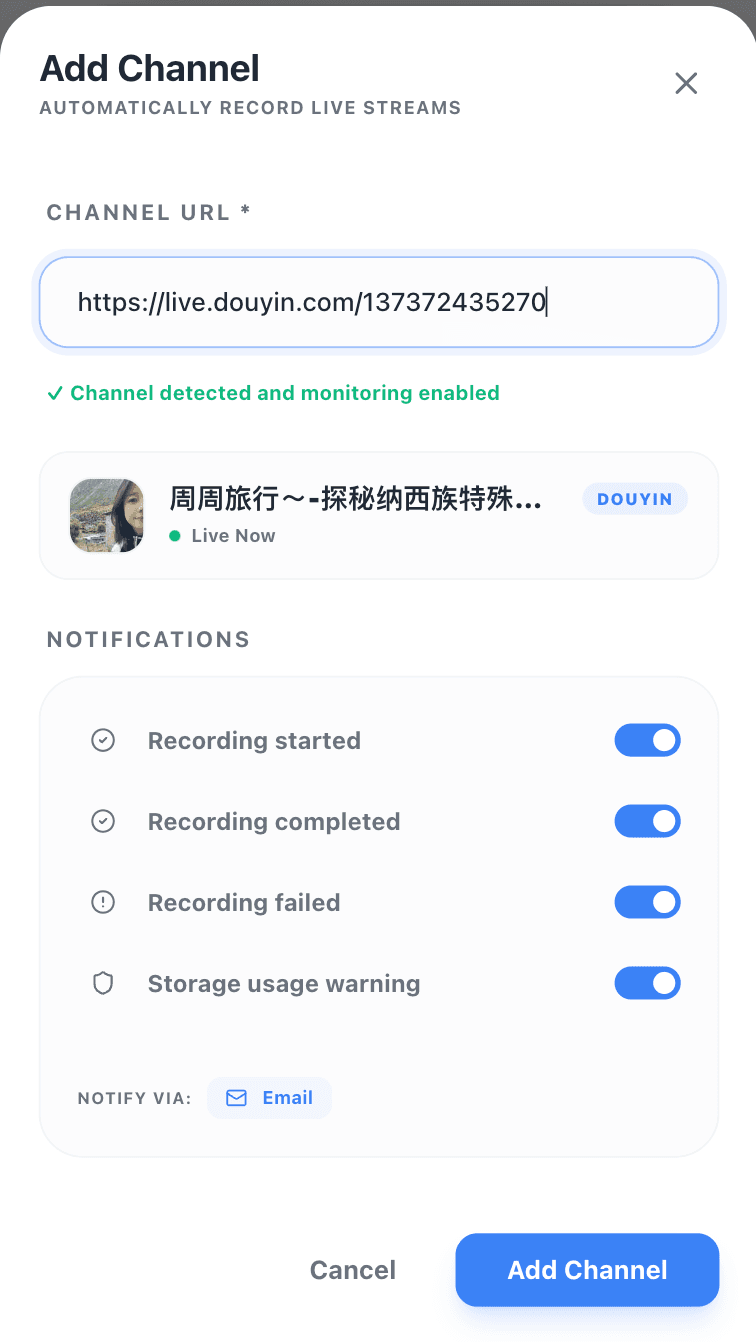
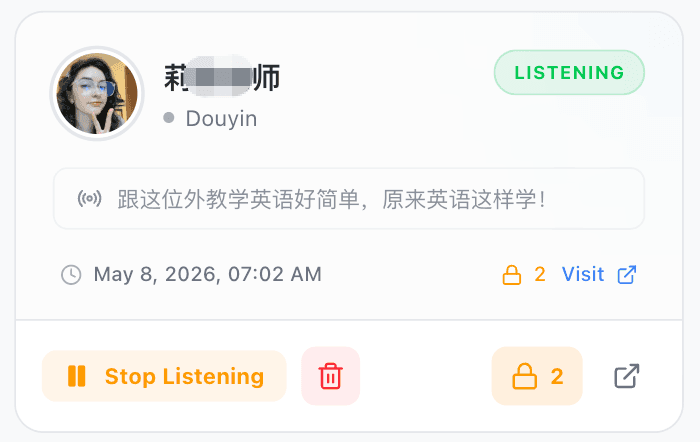
Step 3: Let AutoRecordLive monitor the room
AutoRecordLive checks live availability in the cloud and starts recording automatically when the authorized Douyin session begins.
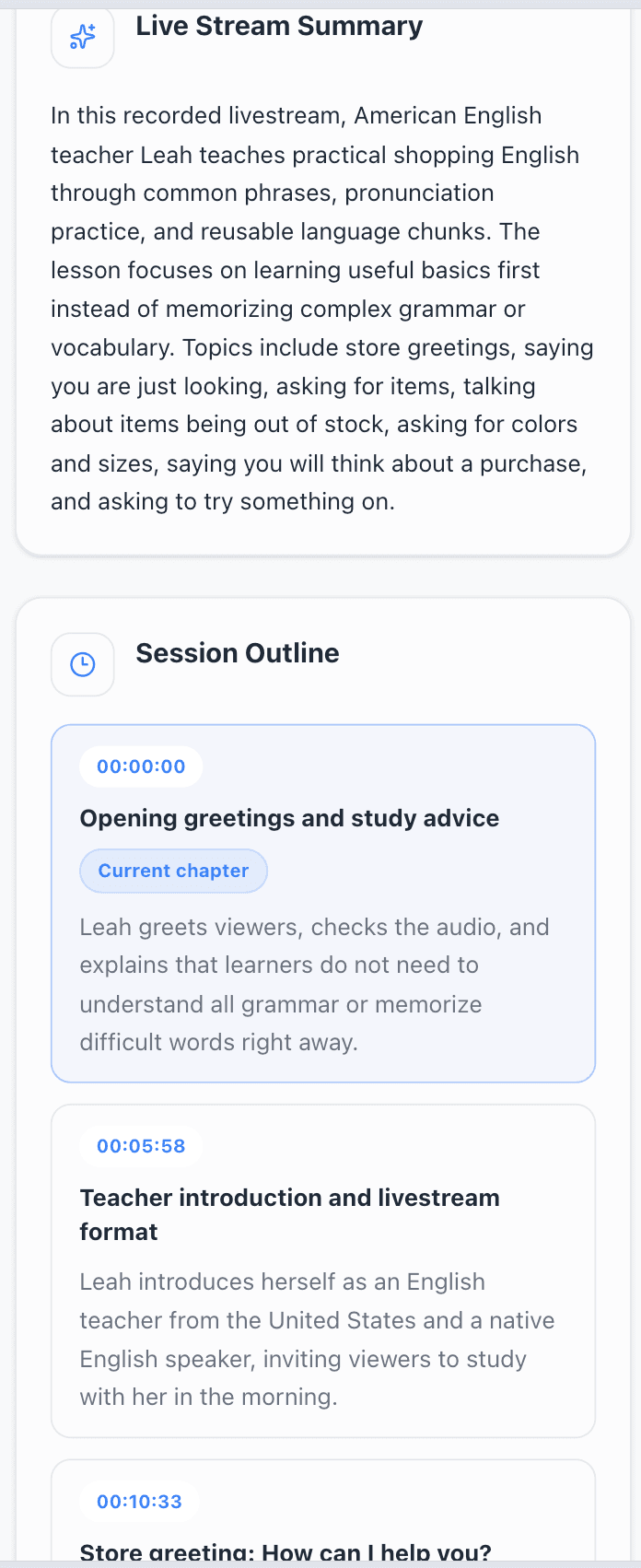
Step 4: Review the processed recording after the live ends
When processing is complete, the recording is available in your private archive so your team can watch it online, review highlights, or export it as an MP4 file when your plan, feature access, and content rights allow it.

Record Douyin Live When You Are Offline
Because monitoring and recording run in the cloud, your team does not need to keep a phone or browser open. Once the authorized Douyin room is added, AutoRecordLive can capture future sessions even when your local device is offline.
Save Douyin Live as MP4
MP4 export is only available for processed recordings in the dashboard, and only when your plan, feature access, and content rights allow it. AutoRecordLive is not a downloader for arbitrary third-party Douyin replays.
Douyin Live Recorder vs Manual Screen Recording
| Feature | Screen Recorder | AutoRecordLive |
|---|---|---|
| Automatic start | No | Yes |
| Works when your device is offline | No | Yes |
| Better for long live sessions | Risk of interruption | Designed for long sessions |
| Private archive after processing | Manual file handling | Yes |
| MP4 export | Manual conversion or transfer | When allowed |
| Unexpected live sessions | Easy to miss | Cloud monitored |
Can You Watch a Douyin Replay Later?
Not always. Replay availability can change after the live ends, and some sessions may not stay available long enough for your team to rely on them.
That is why AutoRecordLive focuses on recording the live session while it is happening for your own or authorized rooms, instead of promising recovery of any old public replay.
Best Practices for Recording Douyin Live
- Add the Douyin live room before the stream begins
- Confirm the live room belongs to your team or is authorized for recording
- Use the dedicated URL guide if the right room link is unclear
- Check monitoring status before an important session starts
- Review processed recordings promptly and export important ones within your retention window
- Follow platform rules and your content rights before sharing the recording
Can I record Douyin Live automatically?
Yes. AutoRecordLive can monitor an authorized Douyin live room and start recording when the stream begins.
Can I record Douyin Live when I am offline?
Yes. Once the room is set up, monitoring and recording run in the cloud, so your local device does not need to stay online.
Can I save a Douyin recording as MP4?
Yes, when the recording has finished processing and your plan, feature access, and content rights allow MP4 export in the dashboard.
How do I find the right Douyin live room URL?
Use the related guide How to Find a Douyin Live Room URL. It covers both currently live rooms and rooms that are not live yet.
Can AutoRecordLive download any old Douyin replay?
No. AutoRecordLive is designed for authorized cloud recording while the live session is happening, not as a public replay downloader.
Is it legal to record Douyin Live?
Only record Douyin live streams you own, manage, or are authorized to record, and follow local law, Douyin rules, and applicable content rights.
Start Recording Authorized Douyin Live Streams
Set up an authorized Douyin live room once. AutoRecordLive monitors it in the cloud, records when the session starts, and keeps the processed archive ready for review.